By Greg Nowak. Last updated 2026-10-15.
Before an invoice reaches your books, you need to know which supplier it belongs to, whether it has already been entered, and whether the amounts add up. AI can extract the details, but those checks still need a place in the workflow.
For an owner or finance operations lead, the useful outcome is a validated accounting import, with anything uncertain sent to someone who can resolve it. That means following the invoice all the way from arrival through extraction, validation, review, and confirmation that the accounting system accepted it.
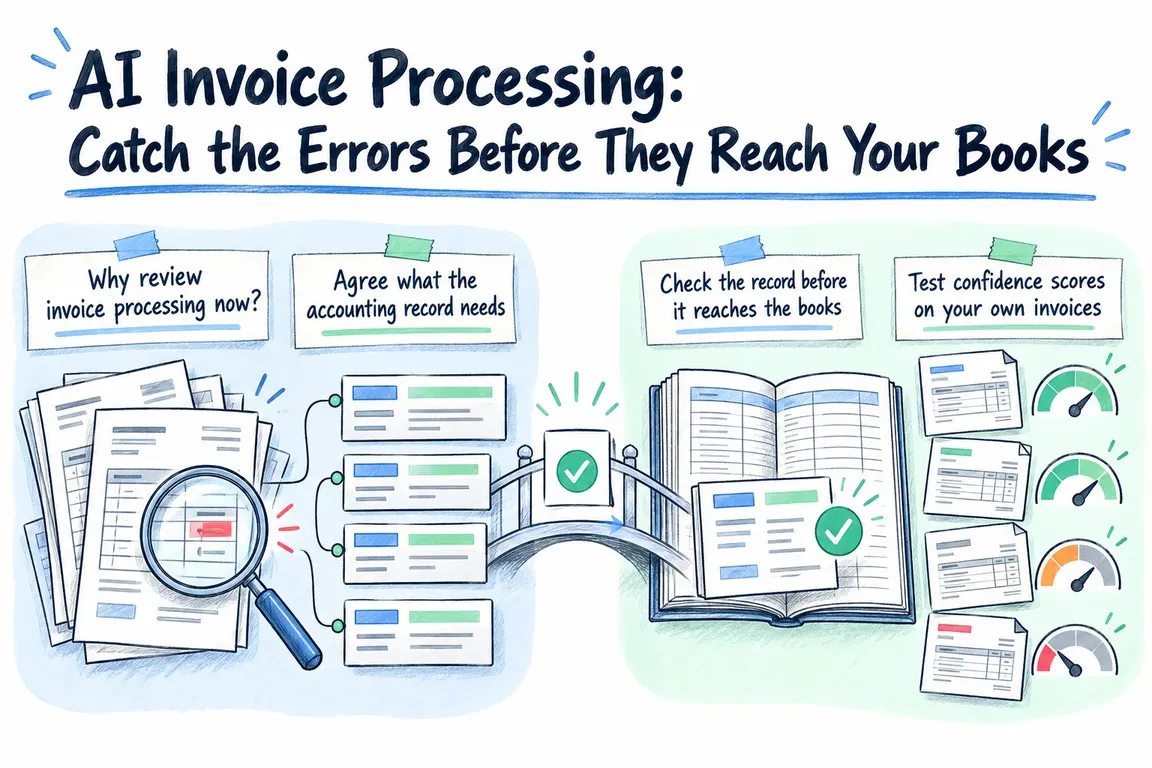
Why review invoice processing now?
Denmark’s digital bookkeeping rollout gives businesses a practical reason to look at how invoices enter their accounts. Virksomhedsguiden’s guidance says other commercial businesses, including personally owned businesses, must use digital bookkeeping from their first accounting period starting after 1 January 2026 if turnover exceeded DKK 300,000 annually in the two preceding income years. Whether that applies depends on the business and its accounting period.
AI extraction is optional. If you already have a bookkeeping system, start with the work people still do by hand: which invoice details they enter, what they check, and where an integration would fit.
Agree what the accounting record needs
Before choosing an extraction tool, define the record you need to import. That might include a supplier identifier, invoice number, invoice date, currency, net amount, tax, total, and required line items. Decide how the record should represent a missing value, too.
Microsoft’s Document Intelligence invoice model is one possible starting point. It extracts invoice fields and line items from digital PDFs, scans, and captured images, then returns structured JSON.
An OpenAI integration can use Structured Outputs to constrain responses to a defined JSON schema. OpenAI explicitly warns that these outputs can still contain mistakes. A total can be a valid number in the right field and still be the wrong amount.
Keep the original invoice alongside the proposed record so a reviewer can check it. Missing essential fields should stop the invoice for review. The record should also distinguish what the tool extracted from anything a person corrected or supplied.
Check the record before it reaches the books
The controls below are a proposed implementation pattern. Agree the rules with whoever is responsible for your bookkeeping, including which exceptions need approval.
For supplier matching, compare the extracted identity with your supplier register. Use an agreed identifier, such as a VAT or CVR number, where available. If the match is ambiguous, send it for review. Creating a supplier or changing payment details should require explicit approval.
Duplicate checks need to cover both invoices already imported and those still waiting in the workflow. Compare supplier identity and invoice number, using the amount and date to help flag possible duplicates. Give the reviewer the candidate records to inspect; an uncertain match should remain available rather than being discarded automatically.
Use application code to check the arithmetic. Agree how it should handle discounts, delivery charges, rounding, and tax, then reconcile the line amounts and totals under those rules. Where an invoice shows both a total and an amount due, keep them separate. If the figures do not reconcile, show the reviewer exactly where the discrepancy is.
| Checkpoint | Ready to proceed when… | If the check fails… |
|---|---|---|
| Required fields | Every essential value is present and can be checked against the invoice. | Hold the record and identify the missing or uncertain field. |
| Supplier match | The details match one approved supplier record. | Show the missing or conflicting identity details for review. |
| Duplicate check | No unresolved match remains among pending or imported invoices. | Show the possible duplicates side by side. |
| Arithmetic | The amounts reconcile using the agreed calculation and rounding rules. | Show the discrepancy and the amounts used in the calculation. |
| Review and approval | Applicable field checks and required approvals are complete. | Keep the invoice in the review queue. |
| Accounting import | The destination confirms acceptance and returns a record reference. | Establish what happened before attempting another import. |
Test confidence scores on your own invoices
A confidence score needs testing before you use it to decide which invoices can proceed without review. Microsoft’s guidance published on 14 October 2026 explains how grounding connects extracted values to evidence in the document, while confidence helps prioritise review. Its Content Understanding guidance recommends calibration by document type and field, using representative documents checked by people, followed by testing on documents held back from calibration. Empty fields need a policy of their own.
Apply that approach to the fields you plan to automate. Agree an acceptable error tolerance, then test whether confidence scores reliably separate correct values from mistakes. Where they do not, keep the field in review. Revalidate the affected rules when document formats or extraction configurations change.
The review screen should put the proposed value beside the evidence that supports it and explain which check failed. Record any correction and approval so you can trace the imported value back to the decision.
Confirm what happened at the accounting handoff
Check the bookkeeping API before committing to an integration. Does it support draft records, document attachments, supplier references, and all the fields your process needs? Map the validated invoice record to those capabilities, and have finance agree any account or tax coding rules.
Give each invoice an explicit status, such as received, awaiting review, approved for import, or imported. Only mark it as imported after checking the destination’s response and saving the accounting record reference.
Retries need particular care. If an import request times out, establish whether the accounting system created the record before sending it again. Use the destination’s duplicate-prevention features where available; where they are absent, provide a reconciliation step. Payment authorisation should remain a separate, explicit approval.
Choose a pilot sample that tests the difficult cases
Use invoices from the suppliers and formats you actually intend to support. Include imperfect scans, missing fields, credit notes, and invoices with adjustments where these occur in your workload. Ask finance to confirm the expected results before assessing the workflow.
Start with a person reviewing every proposed import. Track corrections by field, why invoices enter review, how long exceptions take to resolve, and which imports succeed. Before reducing review, also inspect samples of records that passed the rules.
Those results should help you decide which document groups can proceed under the agreed controls and which still need manual handling. They also give you a more useful commercial assessment: count the review and reconciliation work left after extraction, alongside integration and running costs.
Greg at GrN.dk could assess a representative invoice sample, map the validation and exception rules, and scope an OCR or OpenAI integration with your existing bookkeeping API. Bring the invoices, an outline of the current entry process, and details of the destination system. The first useful deliverable is a tested route from incoming invoice to validated accounting import.
Related on GrN.dk
- From Supplier PDFs to Product Data: Where AI Needs a Second Check
- NGINX Can Read JSON Before Routing—Should It Handle Your AI API?
- That DNS Record Exists—So Why Doesn’t the Subdomain Resolve?
Need help with this kind of work?
Discuss your invoice processing workflow Get in touch with Greg.