By Greg Nowak. Last updated 2026-06-17.
On June 4, 2026, WordPress core published a call for testing for client-side media processing aimed at WordPress 7.1. That may sound like a technical upgrade tucked inside the editor, but it has real operational consequences. When an image is uploaded in the block editor, the browser can now decode, resize, and encode sub-sizes locally using the VIPS library running in WebAssembly, then send those results to the server. If the browser cannot handle that work, WordPress quietly falls back to the traditional server-side path.
That changes more than image formats. It changes where part of the media pipeline runs, which means browser capability checks, security policy, plugin assumptions, and storage or delivery behavior all deserve a proper test pass before release.
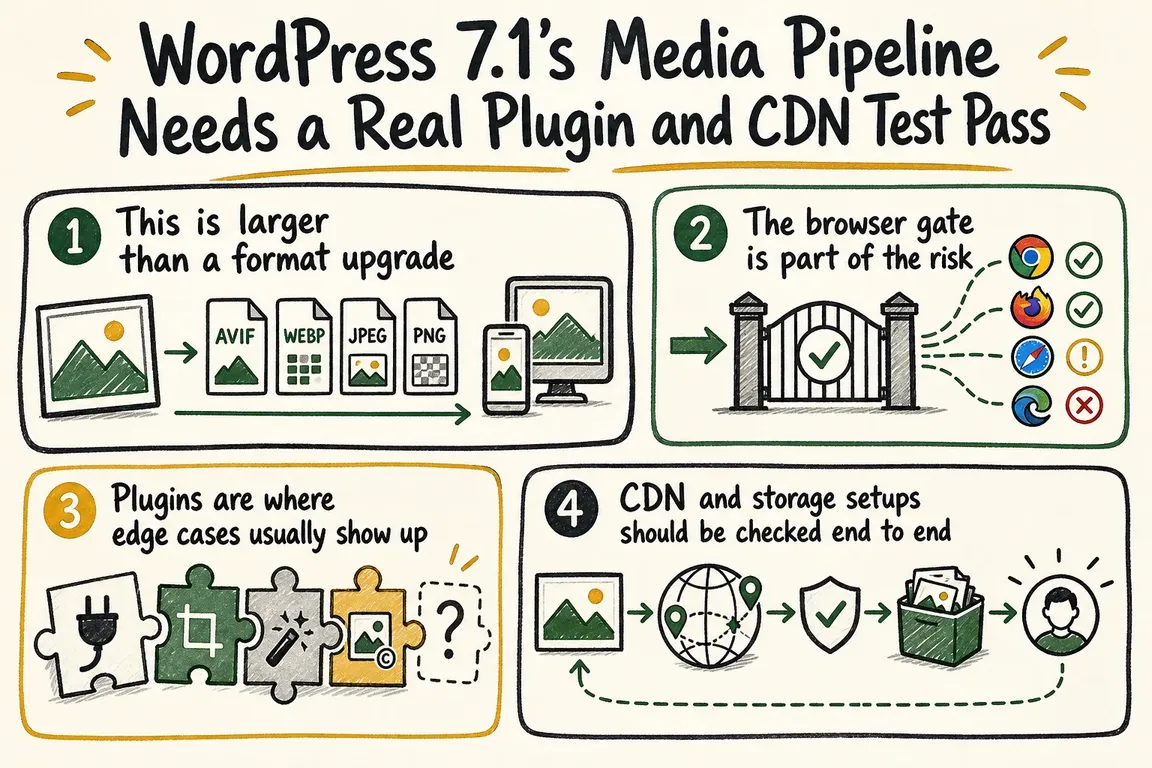
This is larger than a format upgrade
The 7.1 tracking issue makes the scope fairly plain. WordPress spent the 7.0 cycle laying groundwork for browser-side media processing: WebAssembly-based compression infrastructure, an upload queue, worker-thread offloading, SharedArrayBuffer and cross-origin isolation support, AVIF and WebP output, sub-size generation, EXIF handling, auto-rotation, large-image logic, and fallback behavior for unsupported browsers or formats.
The 7.1 work goes further with HEIC support, Ultra HDR handling, more resilient uploads, performance work around concurrent uploads, fixes for output-format filtering and side-loaded media requirements, plus fuller end-to-end testing and documentation. The same issue also tracks animated GIF to video conversion and JPEG XL support as additional features. So the practical question is not whether WordPress can upload an image. It is whether your site behaves predictably when that upload flow becomes conditional, worker-based, and browser-dependent.
| Area to test | What changed in 7.1 | What to verify |
|---|---|---|
| Browser gating | Client-side processing is currently a Chromium testing path. Firefox and Safari default to fallback, and low-memory or Save-Data users are excluded. | Test both the browser-side path and the fallback path on real editorial devices, not just one desktop browser. |
| Security policy | CSP rules that block worker-src blob: force fallback, and wasm-vips documents SharedArrayBuffer and cross-origin isolation requirements. |
Decide whether your policy should allow client processing, then confirm the site actually behaves that way. |
| Formats and variants | WordPress is asking for checks on sub-sizes, output formats, HEIC preservation, large images, Ultra HDR, and JPEG XL. | Verify filenames, MIME results, originals, scaled variants, and front-end rendering across storage and delivery. |
| Upload resilience | The 7.1 work includes retry logic, progress UI, concurrent uploads, crash handling, refresh recovery, and mid-save behavior. | Run batch uploads and repeat them under slow or unreliable network conditions. |
| Plugins and workflows | WordPress explicitly asks media plugins, DAM integrations, and custom workflows to test the new path and its hooks. | Check hook timing, metadata, sideload handling, and any assumptions that only made sense in a server-only pipeline. |
The browser gate is part of the risk
WordPress is not positioning client-side media as universally on. The testing post says non-Chromium browsers are disabled by default because Firefox and Safari do not support Document-Isolation-Policy. Low-memory devices are excluded. Browsers on 2g or slow-2g connections, or browsers sending the Save-Data header, are also excluded because the worker download is large and client-side processing increases upload bandwidth.
MDN adds a useful business detail here: Save-Data is an explicit signal that the user wants reduced data usage, often because the connection is slow or bandwidth is costly. MDN also notes that responses can vary based on Save-Data and that caches should account for that. Even if your stack never inspects that header directly, the bigger point is hard to miss: you should not assume every editor follows the same upload path.
Plugins are where edge cases usually show up
The official testing post directly asks maintainers of media plugins, image optimizers, DAM integrations, and custom workflows to test with client-side media enabled and to exercise the new filters and actions. The 7.1 tracking issue also includes work to move image output format filtering into the upload response and to make sure the REST endpoint for side-loaded media covers all requirements.
That is the compatibility question for a real site. Which parts of your media workflow assumed the server was the place where formats were chosen, sub-sizes were generated, or validation happened? If a plugin inspects uploads after they arrive on the server, expects metadata to exist at a particular step, or rewrites outputs after WordPress generates them, it needs testing under both the client-side path and the fallback path.
CDN and storage setups should be checked end to end
The approved sources do not hand over a ready-made CDN checklist, but they do make the need for one obvious. WordPress is asking testers to confirm that all expected sub-sizes exist, compare file size and visual quality against the classic media-library route, verify configured output formats including the -scaled variant, preserve the original HEIC upload, and test both baseline and fallback behavior. Those are exactly the details that decide whether a CDN-backed or object-storage-backed media setup keeps working cleanly after release.
If your delivery layer expects a fixed set of filenames, MIME types, or derivative assets, this is not a good place for assumption. The 7.1 work introduces more browser-side format handling, more conditions that trigger fallback, and more concurrency and resilience logic around uploads. The sensible job is to trace the full path: editor upload, generated variants, storage location, delivery URL, and front-end rendering.
The underlying library explains why the environment matters
The engine underneath this work, wasm-vips, is not a light helper. Its documentation describes libvips compiled to WebAssembly for the browser and Node.js, with pipeline-based and parallel image processing plus lower memory use because it does not keep entire images in memory. It also documents runtime requirements such as WebAssembly SIMD and exception handling support. For browser use, it notes that SharedArrayBuffer requires the site to opt into a cross-origin isolated state.
That helps explain why WordPress is calling for testing across real browsers, real devices, CSP rules, and weaker hardware. This is no longer just a PHP-and-plugin concern. Part of the media pipeline now depends on browser features and runtime policy.
What a sensible pre-7.1 QA pass looks like
A good test pass does not need to be huge, but it does need to be deliberate. WordPress says to use the latest Gutenberg plugin and a Chromium browser when you want the feature active during testing, and to confirm that status rather than assume it. Start with baseline uploads for JPEG, PNG, WebP, AVIF, GIF, and HEIC where available. Test Chromium and fallback browsers separately. Confirm whether your CSP allows the intended path or forces fallback. Check configured output formats and generated sub-sizes. Batch upload 10 to 20 images. Simulate a slow or flaky network. Try saving mid-upload. Refresh mid-upload. Then repeat the important paths with any media plugin, DAM connector, optimizer, or custom workflow that touches uploads.
That is where GrN can be useful. Greg can run a focused QA pass across browser support, CSP rules, plugin behavior, storage and CDN paths, and editorial upload flows, then patch filters or fallback behavior before WordPress 7.1 reaches production. For sites with even mildly custom media handling, that is usually far cheaper than discovering after release that one browser silently fell back, one filter now fires too late, or one delivery path no longer receives the variant an editor expected.
WordPress is right to treat this as a substantial shift in how the platform handles images. A clean install proving the feature works is not the same as a production stack being ready for it. WordPress 7.1's media pipeline deserves a real plugin and CDN test pass before it gets a quiet rollout.
Related on GrN.dk
- WordPress 7.0's React 19 Upgrade Makes Custom Block QA a Paid Compatibility Job
- Drupal 10 Has a December 2026 Deadline, So Upgrade Inventory Has Become a Real Client Project
- MariaDB 10.6's July 2026 end-of-life makes quiet CMS hosting debt a paid database upgrade project
Need help with this kind of work?
Book a WordPress 7.1 media QA pass Get in touch with Greg.










