By Greg Nowak. Last updated 2026-10-11.
A website can serve visitors over HTTP/2 while its application still receives HTTP/1.1 requests. That can be a perfectly sensible setup. When a CDN, hosting provider and agency share responsibility, the harder question is whether anyone can explain—and test—the whole request path.
My starting recommendation: offer h2 over HTTPS for public traffic, retain HTTP/1.1 compatibility, and choose internal protocols according to application support and measured need. For a business owner, the useful outcome is reliable forms, checkouts and APIs, with clear ownership when something fails.
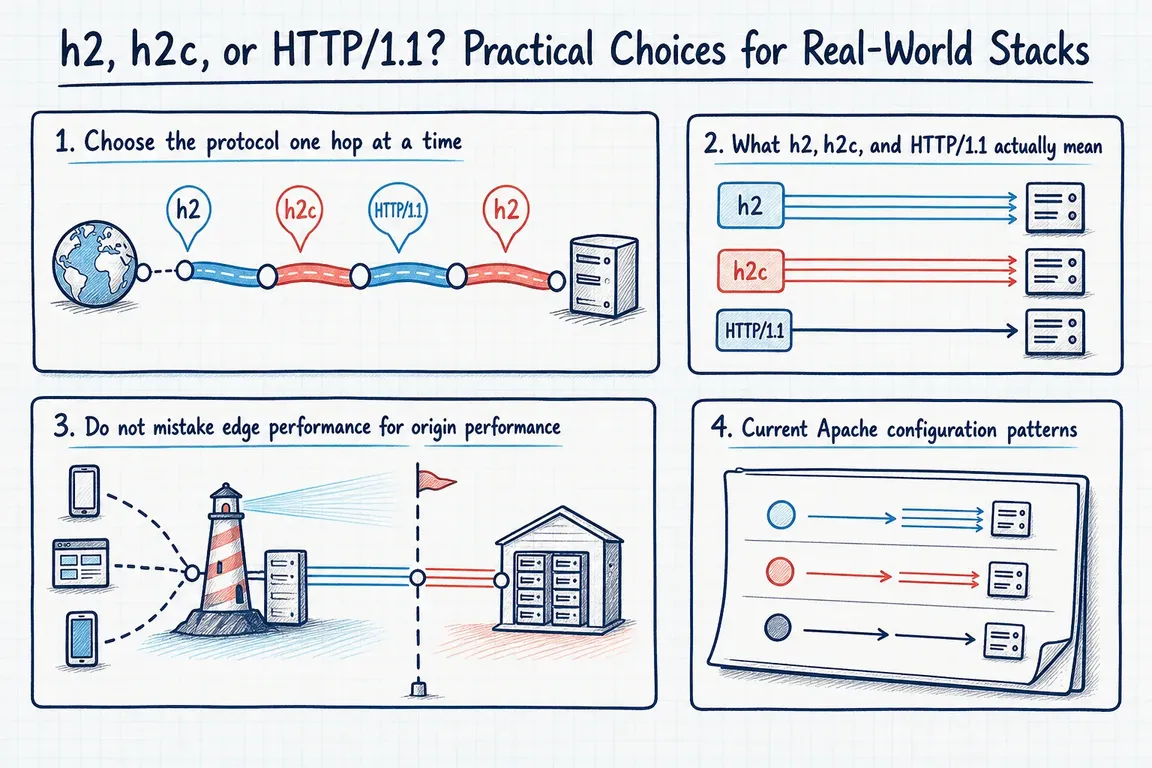
What is the difference between h2, h2c and HTTP/1.1?
Short answer. h2c is HTTP/2 over plain TCP, without TLS. The "c" stands for cleartext. h2 is HTTP/2 over TLS, and HTTP/1.1 is the older text protocol that still works everywhere. Browsers only speak HTTP/2 over TLS, so you meet h2c between a proxy and a backend, in gRPC services and in test setups, never on a public website.
h2 means HTTP/2 over TLS. Client and server select it through ALPN during the TLS handshake. HTTP/2 allows concurrent requests to share a connection and compresses headers, which can reduce connection overhead.
h2c commonly means cleartext HTTP/2. There is an important distinction: RFC 9113 deprecated the old Upgrade: h2c mechanism. For new cleartext deployments, use prior knowledge: both endpoints are configured for HTTP/2 and communication starts with its connection preface. These behaviours are defined in the HTTP/2 specification.
HTTP/1.1 remains a reasonable upstream choice. A quiet application with working connection reuse may gain little from a protocol change. Slow database queries, cache misses and oversized responses still need their own fixes.
Also separate encryption from protocol version: HTTP/1.1 can use HTTPS; h2c provides no TLS protection itself. An internal hostname alone is insufficient justification for cleartext.
Choose each connection separately
A CDN can accept one protocol and use another towards your origin. Browser developer tools therefore cannot tell you which protocol connects the proxy to the application. Use this matrix as a starting recommendation, then confirm what your providers support.
| Connection | Practical starting point | Before changing it |
|---|---|---|
| Browser to CDN or server | h2 over HTTPS, with HTTP/1.1 compatibility | Check certificates and actual negotiation; existing HTTP/3 can coexist. |
| CDN to origin | HTTPS using supported HTTP/1.1 or h2 | Confirm provider settings, certificate validation and origin errors. |
| Proxy to application | Retain working HTTP/1.1; test HTTP/2 where useful | Check software versions, connection reuse and application compatibility. |
| Controlled internal service | h2; cleartext HTTP/2 only with explicit justification | Document protection of the path and prior-knowledge support. |
| Legacy application or appliance | HTTP/1.1 where required | Check vendor constraints, timeouts and connection limits. |
Apache: make the intended behaviour explicit
With mod_http2 loaded, add this to an existing, correctly configured TLS virtual host:
Protocols h2 http/1.1For a separate, controlled cleartext virtual host that needs prior-knowledge HTTP/2:
Protocols h2c http/1.1
H2Direct on
H2Upgrade off
H2Direct accepts the HTTP/2 preface immediately; H2Upgrade off disables the older upgrade route. Check existing clients before disabling a mechanism they use.
The Apache module documentation also highlights additional workers and memory consumption. Monitor both under load. Where virtual hosts share certificates, align their TLS settings: inconsistent settings can trigger 421 Misdirected Request when clients reuse connections across hostnames.
NGINX: distinguish visitor settings from upstream settings
For NGINX 1.25.1 and later, these lines belong inside your existing HTTPS server block, alongside its certificate configuration:
listen 443 ssl;
http2 on;
Older configurations commonly use listen 443 ssl http2;. Check the installed version with nginx -v before editing. The HTTP/2 module documentation marks http2_push and http2_push_preload obsolete; remove stale push tuning during the review.
Enabling visitor HTTP/2 does not enable it upstream. Generic HTTP proxying gained proxy_http_version 2; in 1.29.4 and requires the HTTP/2 module. HTTP/1.1 became the proxy default in 1.29.7; earlier versions defaulted to HTTP/1.0. In a compatible existing proxy location, the protocol selection is:
proxy_http_version 2;Keep the existing proxy_pass destination and review its TLS configuration separately. NGINX disables upstream certificate verification by default. For HTTPS origins, configure proxy_ssl_verify on;, trusted CA certificates, and the appropriate certificate name and SNI settings. The proxy module documentation covers these controls. These snippets are configuration changes, not complete server definitions.
Test what actually negotiated
Run these against your own endpoints, replacing the example hostnames:
curl -V
curl -sS -o /dev/null -w '%{http_version}\n' https://example.com
curl --http1.1 -I https://example.com
curl --http2 -I https://example.com
curl --http2-prior-knowledge http://internal-service:8080/health
curl -V should list HTTP2 support. The second command reports the version used. Crucially, --http2 over HTTPS permits negotiation and can fall back to HTTP/1.1; a successful request does not prove HTTP/2 was used. The -I checks send HEAD requests, so also test real GETs, uploads and submissions.
The final command assumes a cleartext HTTP/2 endpoint. For an HTTPS test offering only HTTP/2 through ALPN, curl 8.10.0 and later supports:
curl --http2-prior-knowledge -sS -o /dev/null -w '%{http_version}\n' https://example.comSee the curl manual for version-dependent behaviour. Repeat checks at accessible internal boundaries and corroborate them with proxy logs.
h2c questions that come up
Is h2c deprecated?
Only the upgrade route. RFC 9113 deprecated starting a connection as HTTP/1.1 with an Upgrade: h2c header. Cleartext HTTP/2 with prior knowledge, where both sides know in advance that they speak HTTP/2, is still valid.
What does Protocols h2 h2c http/1.1 mean in Apache?
It lists the protocols Apache may offer, in order of preference. On a TLS virtual host only h2 and http/1.1 apply. On a plain HTTP virtual host only h2c and http/1.1 do. The single line is a common default because it works in both kinds of host.
Does NGINX support h2c?
Yes, with prior knowledge. http2 on; in a server block without ssl accepts cleartext HTTP/2 from clients that open with the HTTP/2 preface. NGINX does not implement the Upgrade: h2c route.
Do I need h2c at all?
Usually not. If the hop from proxy to application is fast and HTTP/1.1 keep-alive works, h2c buys little. It earns its place for gRPC, which requires HTTP/2, and for backends that serve many concurrent streams over one connection.
Make the rollout easy to judge
- Map ownership. Record every intermediary, TLS termination point and responsible team.
- Set a baseline. Capture errors, timeouts, memory, connection counts and p95 latency—the response time covering 95% of requests.
- Change one connection. Validate configuration, keep a rollback copy and agree what deterioration triggers reversal.
- Exercise business journeys. Test authentication, forms, checkout, uploads, APIs and streaming under representative concurrency.
- Keep the evidence. Compare results and document the chosen protocol, verification commands and owner.
If your team needs help joining the dots between hosting, CDN and application settings, Greg can help map the path, assess the options and coordinate a tested rollout. Talk with Greg about your web stack.
Related on GrN.dk
- NGINX 1.30 changed upstream connection reuse: what to check before you upgrade
- A stray Set-Cookie can waste your CDN: audit the cache at the edge
- MariaDB 10.6 EOL: quiet CMS hosting debt needs a real upgrade plan before July 2026
Need help with this kind of work?
Talk with Greg about your web stack Get in touch with Greg.










