By Greg Nowak. Last updated 2026-10-01.
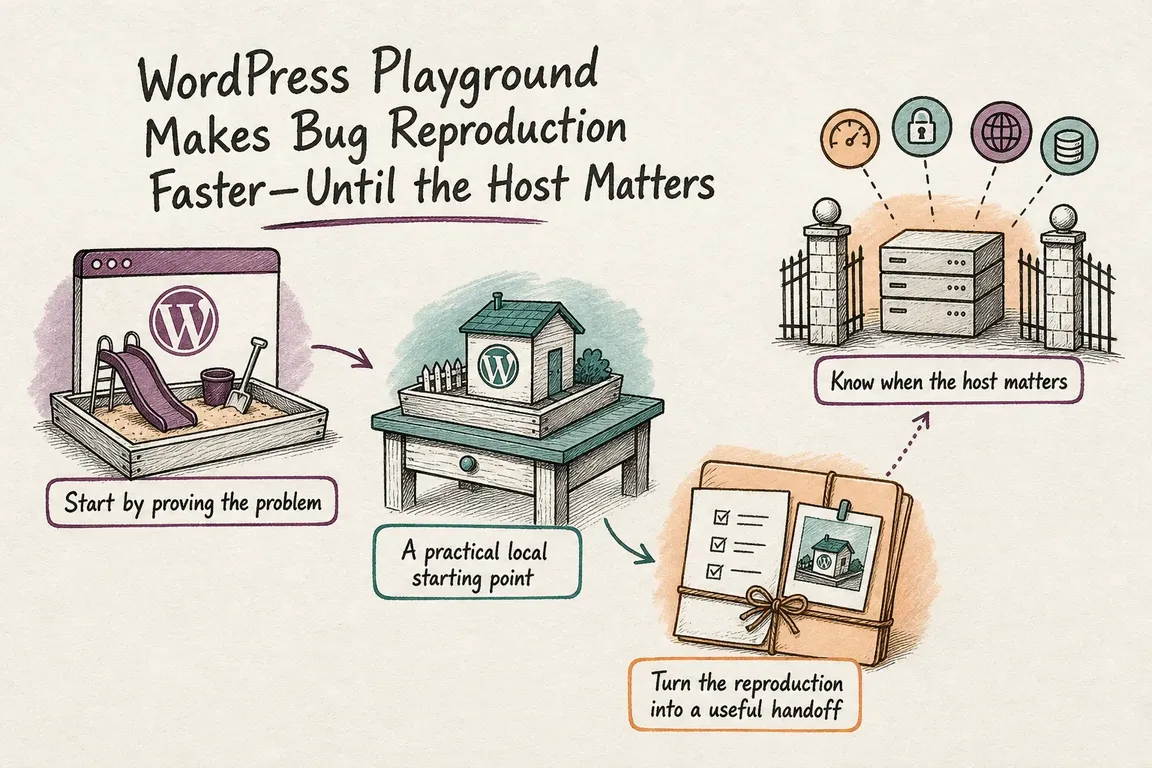
“Checkout broke after the update” is a serious report, but it is not yet a reproducible bug. A developer needs to know which update, what action triggers the failure, and whether it happens outside the live site. WordPress Playground helps answer those questions without first building a copy of production.
For an owner or agency lead, the benefit is a clearer handoff. The team can test a clean installation, add the suspected components, and give a developer or vendor a setup they can run. The judgment call is knowing when that small test has answered enough—and when the real host is part of the problem.
Start with the smallest test that could fail
Write down the affected page or admin action, the expected result, the actual result, the user role, and the first version or date when anyone noticed the change. Capture an error message if there is one. For a checkout issue, specify the payment method and the point where the flow stops; “checkout is broken” leaves too many possibilities.
Open a fresh browser Playground for a quick check of a plugin, theme, editor, or WordPress version. If the failure does not appear, add the relevant extension and settings one at a time. A clean test that works is useful evidence, but it does not clear the plugin: the missing ingredient may be another extension, site data, or a host service.
| What you need to learn | Start here | Move on when |
|---|---|---|
| Does a basic WordPress or plugin setup fail? | Browser Playground | You need local code, repeatable runs, or a fuller setup. |
| Which code or version causes the failure? | Playground CLI and a Blueprint | Database or server behavior appears relevant. |
| Does it fail with MySQL or container services? | Docker-based wp-env | The issue still depends on the actual host configuration. |
| Will the proposed fix work where the site runs? | Sanitized host staging | Release checks are complete. |
Use the CLI when someone needs to repeat the test
The Playground CLI requires Node.js 20.18 or newer. Its start command detects a plugin or theme in the current directory, opens a browser, logs in, and retains the managed test site between sessions. Run it from the project directory so the saved site stays associated with that project.
cd my-plugin
npx @wp-playground/cli@latest start

# Replace these with the versions reported for the failing site
npx @wp-playground/cli@latest start --wp=6.8 --php=8.3

# Apply a documented test setup
npx @wp-playground/cli@latest start --blueprint=./bug.json
Keep the exact command in the ticket. If you need to test from a clean installation again, npx @wp-playground/cli@latest start --reset deletes that project’s stored test site before starting. Save anything you need from it first. Teams still using the deprecated @wp-now/wp-now package can move their usual start workflow to the Playground CLI.
Make the handoff runnable
A Blueprint is a JSON recipe for a Playground setup. It can specify WordPress and PHP versions and prepare the plugins, content, or options needed for a test. It works in browser and Node.js Playground flows. That makes it a useful attachment when an agency needs a plugin vendor or another developer to see the same failure.
Put the Blueprint or command beside a short set of numbered actions: open this screen, choose this option, save, and observe this error. Record the versions and whether disabling unrelated extensions changes the result. Use dummy orders and sanitized content. Remove customer details, credentials, and licence keys before sharing the recipe or a site export.
Also state what the test does not establish. “Fails on a clean Playground with this plugin” is a strong clue about the code. “Works in Playground but fails on staging” points the investigation toward conditions the small environment did not reproduce. Both findings save time when they are reported precisely.
Escalate when the environment becomes the suspect
Playground is a poor final judge for a failure tied to MySQL-specific queries, object caching, a CDN, mail delivery, scheduled jobs, filesystem permissions, web-server rules, or production resource limits. At that point, test against a closer match to the live stack. The goal is to reproduce the relevant dependency, not to copy every production detail.
If the team already uses wp-env, it can run an experimental Playground runtime with npx @wordpress/env start --runtime=playground. WordPress documents useful support there, including plugin and theme mounting, custom PHP versions, and Xdebug. It also documents a key difference: that runtime uses SQLite, while Docker-based wp-env uses MySQL. The Playground runtime does not support wp-env run or SPX profiling. Choose Docker when those differences affect the question you are testing.
Browser Playground has a separate practical limit. Its recent autosaves are recovery points, not durable backups; WordPress says it retains up to five. Save the Playground or export a ZIP if the test must survive beyond the current experiment.
Finish with a release decision
Once a developer has a fix, rerun the original steps and check a nearby path that could have been affected, such as another user role or payment method. Then validate on safe staging with the database, integrations, and host settings that matter. A successful Playground run is evidence that the code change helps; staging is where the team checks whether it is ready for the real site.
If a WordPress issue keeps bouncing between your team, a vendor, and the host, talk with Greg about turning the report into a repeatable test and a clear decision on what to check next.
Related on GrN.dk
- Debugging WordPress on a Live Site: A Safer Production Workflow
- Google Can Call Your Business. Is Your Local Data Ready?
- How to Check Whether a PHP Constant Is Defined (Without Breaking Production)
Need help with this kind of work?
Discuss a WordPress troubleshooting issue with Greg Get in touch with Greg.